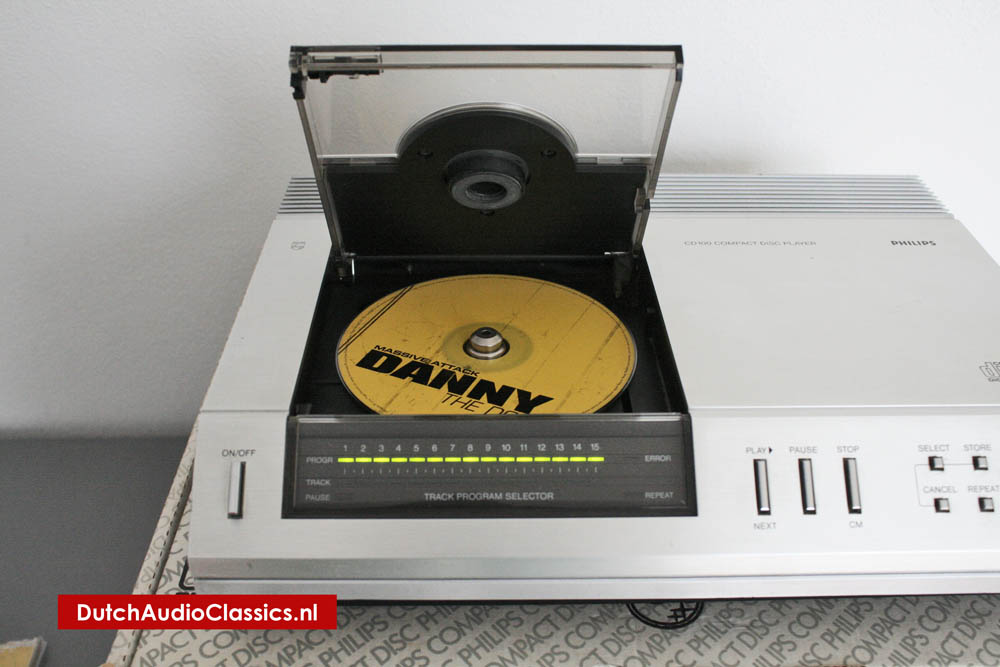
This is the simplest CD player in a range which Philips plan to introduce, and indeed they claim that it is the smallest on the market (being identical, except for external finish, to the Marantz CD-63). It is a top-loader and therefore not entirely suited to stacking in a rack or minisystem—unless it can be located at the top. The disc compartment lid is mechanically latched but will operate the stop mechanism if pressed to open during play. Inserting and removing the disc is easy, if not quite so simple as on the glidingdrawer front-loading types.
The sloping front panel carries basic, but well laid-out, controls and a sensible display scheme. The latter consists of green bar-lights (1 to 15) to show the number of tracks on the disc (or in the selected programme) with a second row of lights to indicate the track being played. The mains on/ off button is to the left of the display panel and on the right are buttons for play/next track, pause and stop/clear memory. Then follow four small buttons for the programming and repeat functions. Each track to be stored (up to 15) must be selected by pressing the `select' button the requisite number of times (or holding it down while it hops through the numbers sequentially) followed by the 'store' button to enter it in the memory.
![Philips first compact disc player CD100]()
This can take a fair amount of time, depending on the sequence desired, but works smoothly enough—and at least the track selection is sequential and so, if track 12 is to follow 11, for example, a single tap on the select button will move the 'select' function to 11 As well as building up a programme sequence by this 'add-in' procedure, it is possible—and preferable where most of the tracks are to be included in their normal order—to adopt a 'take out' procedure using the 'store' and 'cancel' buttons together. The 'repeat' button is self-explanatory in that it will cause the machine to repeat the whole disc or the sequence already programmed. However, repeating a single track can be initiated by selecting the track number and pressing 'play' once again.
Cue searching involves use of the rewind and fast forward buttons but, since there is no sound during searching, trial and error is necessary. Naturally the process can be speeded up if the desired track is first located by normal means, and searching carried out from there. The pause function interrupts play, though the disc keeps spinning, and restart from the same spot can be triggered by pressing either the pause or start button.
CD decoding
The signal picked up by the photodetector is a frame struc-tured data stream containing a great deal of information in EFM (eight-to-fourteen modulation) format. The first stage of decod-ing is to establish clocking (timing), and to retrieve the 8-bit format from the EFM format. For this purpose, the syn-chronisation pattern is separated from the control and display symbol and the (audio) data symbols. Clocking will eliminate small timing errors (jitter) in the data stream, caused e.g. by disc speed variations. The second stage of decoding is application of error correction and interpolation to the data symbols.
In the third stage, left and right channel data words are demultiplexed (split apart) and separately converted back to analogue for to provide normal-style stereo pre-amplifier input signals. Meanwhile, the derived clocking signal is compared with a quartz crystal controlled oscil-lator reference frequency. Any discrepancy generates an imme-diate correction signal for the disc motor speed servo system. This servo system, together with the abovementioned clocking operation of the data stream, is making wow and flutter com-pletely inaudible.
![Philips CD encoding circuitry]() The CD decoding circuitry
The CD decoding circuitry
It can be seen that before the signal is returned to its analogue state, it is subjected to consider-ableprocessing in the digital condition. Digital processing is entirely a switching operation, with the necessary timing and synchronisation. For the Com-pact Disc player, with 588 chan-nel bits per frame and a data stream bit rate of well over four million bits per second, thou-sands of instantaneous switch-ing circuits are needed. Only with the development in the last few years, of large scale inte-grated circuits (LSI's), has it become possible to produce such circuitry within the small dimensions and economics necessary to make Compact Disc Digital Audio a practical proposition.
The optical readout
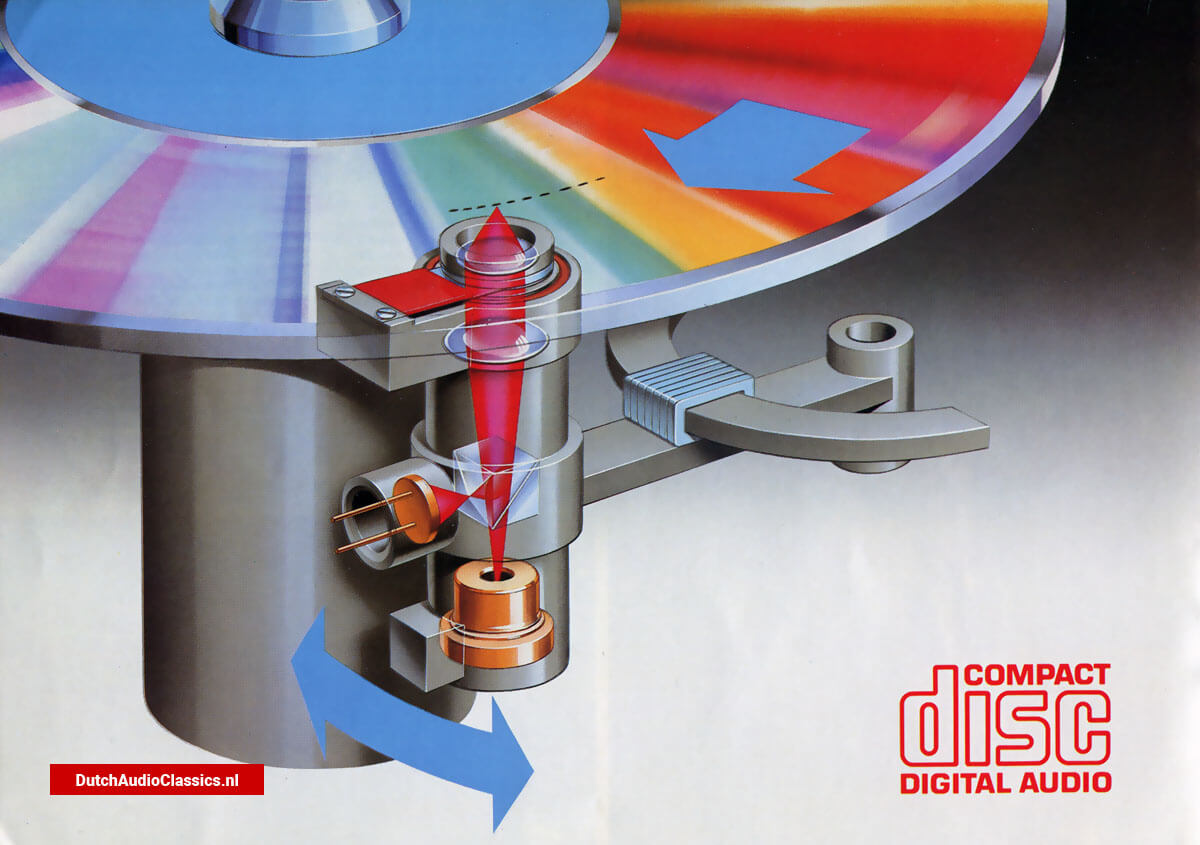
Apart from digitalisation, Compact Disc Digital Audio introduces another very significant innovation — optical read-out using a laser beam. In essence, a laser is a source of highly concentrated light which can be very sharply focused. The word 'Laser', in fact, stands for Light Amplification by Stimulated Emission of Radiation, and because of the precise nature of the beam, the laser princ¬iple has already found many applications in science and industry.
The Compact Disc laser, a small, low-power semi-conductor (aluminium gallium arsenide) unit, emits invisible infra-red light.
![Philips optical readout]() The CD Laser Beam Pick-up: one milliwatt of power is all that is needed by the tiny light beam. Yet it reads every last detail of the digital information on the disc.
The CD Laser Beam Pick-up: one milliwatt of power is all that is needed by the tiny light beam. Yet it reads every last detail of the digital information on the disc.
The Compact Disc optical read-out system achieves a read-out accuracy, from an extremely high-density digital recording, that no mechanical system could ever hope to attain.
Dust particles and scratches sit on the disc surface, out of the focus of the laser beam. Because the beam is highly convergent, most particles and scratches are small in relation to the spot diameter
Philips CD Optical Readout System
The beam from the laser is reflected by a special semi-reflecting mirror to the lens system, which keeps it in sharp focus on the recording in the Compact Disc. Beam reflections returning through the lens system pass straight through the semi-reflecting mirror, and on to the photo-detector.
An optical system concentrates the laser beam to a spot less than 1 micron (pm) in diameter, capable of reading the densely packed recording in the Compact Disc. This recording consists of a contin¬uous track of pits in a brightly reflective surface. The pits are microscopic - only 0.5 pm wide, 0.1 pm deep and 1 to 3 pm long, at a track pitch of 1.6 pm.
As the disc rotates, the laser scans the pit pattern. When the beam falls on a flat surface, it is reflected. The optical system guides the reflected beam to an array of photodiodes. When the beam falls into a pit, it is scattered. Very little light finds its way through to the photo-diode array. The flats and pits on the recorded track are thus read as 'on' and 'off' impulses by the photodiode array. The sequence of impulses forms the data stream of channel bits for the player electronics.
The beam reads the recording from the inside to the outside of the disc. A servo system holds the spot in focus on the recording surface, compensating for disc warp or any other unevenness in disc rotation. A second servo compensates for eccentricity and holds the beam on the track. This tracking servo is also used to move the beam across tracks, to gain fast access to any part of the recording, and to create pauses in the music.
Tracking and Focusing: choosing the best method
Player performance depends heavily on effective tracking and focusing. Eccentricity may swing the rotating disc up to 300 pm from side to side, but the spot should follow the centre of the track within 0.1 pm. Disc warp may be as much as 1 mm, but the spot should focus on the track within 0.5 pm. The spot should also stay in position in spite of shock, vibration or dropouts. But it needs to cross tracks quickly for track skip or music search. These are tough require¬ments. But the Philips CMD 2 Laser Assembly, with its control servos, meets them all.
Single-spot or 3-spot Beam?
A single-spot beam can be mounted on a pivoted arm or a linear tracking sledge. Philips use a pivoted arm, which moves very fast for track access, and is highly sensitive to tracking corrections.
The traditional disadvantages of the pivoted arm do not apply to a laser beam pick-up, with its electronic servos. A 3-spot beam must be mounted on a linear tracking sledge, which may compromise the fast access and tracking sensitivity. At the same time, the secondary spots are vulnerable to inter¬ference from adjacent tracks, which can affect tracking and focusing.
For tracking, Philips players use a single-spot laser on a low-inertia pivoted arm, in preference to a 3-spot laser on a linear tracking sledge. The pivoted arm, with linear magnetic drive, moves faster (less than a second from inner to outer track). It follows large ecce.itricities easily, withstands bumps well, and, with only one moving part, is reliable and long-wearing. Mechanically isolated by fully floating suspension, it is practically immune to shock and vibration.
![Philips CD Optical Readout System]() The beam from the laser passes straight through a special semi-reflecting prism and on to the lens system, which keeps it in sharp focus on the recording in the Compact Disc. Beam reflections return through the lens system to the semi-reflecting prism, where they are diverted away from the laser and into the photo-detector.
The beam from the laser passes straight through a special semi-reflecting prism and on to the lens system, which keeps it in sharp focus on the recording in the Compact Disc. Beam reflections return through the lens system to the semi-reflecting prism, where they are diverted away from the laser and into the photo-detector.
Because the read-out is optical, the 'pick-up' causes no more wear to the recording than reading causes to the words printed on this page. In fact, the reflective track surface is covered with a transparent plastic seal, which affords permanent protection. The very high opening angle of the objective lens keeps surface scratches, dust and dirt well out of focus, and only really large marks are detected by the photo diodes. Even then, the CIRC error correction system increas¬es the capability to cope with severe optical distortion arising from dirt or damage.
![Philips CD encoding circuitry]() The decoding diagram
The decoding diagram
The Compact Disc Users Pack
Each Philips Compact Disc player comes with a fully complete Users Pack. Besides the operating instructions, the Users Pack has been designed to help the Philips Compact Disc owner gain the full benefit of his purchase.
A free disc is included featuring 14 different tracks which fully illustrate the sound quality and capability of the Philips range of Compact Disc players.
In addition, there are two full colour brochures which provide detailed information about laser and digital technologies and how they are used to full effect in Philips Compact Disc. A catalogue of disc titles is included with the option of joining the Philips CD Club. Membership of the Philips CD Club entitles the CD owner to receive free of charge, the latest catalogue of disc titles and other interesting material relating to Compact Disc.
The users pack also include instruction for use in 10 languages and a cleaning duster. The users pack is also intended to be kept by the user to house the cdplayers documentation and transport screws.
![Philips CD user's pack]() The Philips CD users pack
The Philips CD users pack
The arrival of Compact Disc
The time has come. Compact Disc Digital Audio is here. The new "miracle" system for enduringly better sound and computer-age operating convenience.
Pure, perfect sound
Compact Disc Digital Audio is a totally new sound source; fully digital, and astonishingly accurate. From the master recording right through to the stereo signals that feeds the audio amplifier - nothing is added, nothing is taken away.
From the lowest frequencies to the highest levels, the sound that is heard is an exact copy of the sound that was recorded; no detectable noise, no measurable wow and flutter.
Dynamic range is exceptional, frequency response is mirrorflat, and overall channel separation and phase linearity are extremely good.
In a word, Compact Disc sound is purer - and you can certainly hear the difference.
Sound in shining armour
The digital recording is sealed inside the shining silver disc - safe from scratches, fingerprints and dirt. The pick-up is a laser beam. It could not wear out a disc if it ran for a hundred years. Special modulation (EFM) and error correction (CIRC) systems optimise signal handling and further suppress the effects of marks and scratches.
Thus, pure Compact Disc sound is everlasting sound. In normal use, CD recordings far outlast any conventional record.
Automatic control and direct access
Compact Disc introduces a totally new concept of ease, convenience and programmability. The digital codes on the record, detected in the player under fingertip control, and introduce unprecedented programming potential. Philips use this potential to great effect in the Philips cd100.
Plentiful software
Compact Disc already has big support from the recording studios. Many familiar labels appear on these shining silver discs, so that a wide choice of music from the world's leading artistes is available. And choice will expand fast as more and more CD players come into use.
The best sound ever
The cd100 is more than just a Compact Disc player; it offers the highest sound quality, the greatest operating ease and facility, and the best reliability - because Philips have the priceless advantage of the longest experience in Compact Disc technology.
Rack top or free-standing
The slimline cd100 is 420mm wide - the standard width of most of today's system components. So it makes a perfectly fitting crown for a HiFi rack.
Alternatively, it is an exciting focus of attention as a free-standing HiFi component.
Connects to any sound installation
The cd100 connects directly to any sound installation with a line input (CD/TV, AUX, TAPE or TUNER). It will bring the very best out of any installation, but the better the sysyem, the bigger the advantage gained.
Specifications Philips cd100
Playback system: Compact Disc Digital Audio
Audio performance: (20Hz - 20kHz)
Frequency range: 20 hZ - 20kHz, ±0.3dB
Phase linearity: ±0.5º
Signal to noise ratio: >90dB
Channel separation: >90dB (at 1kHz)
T.H.D. (incl noise): <0.005%, <0.004%(at 1Hz)
Intermodulation distortion: <-86dB(at max. output level)
Out-band rejection (frequencies 24kHz): >50dB
Wow and flutter: Quartz control precision
Optical read-out system
Laser type: semiconductor Al Ga As
Numerical aperture: 0.45
Wave length: 800nm
Output
Max.output level (at MSB): 2V rms, typical
Output impedance: <100 ohm
Minimum load impedance: 10k ohm
Power supply
Mains voltages: 220V ac
Mains frequencies: 50 and 60Hz
Power consumption: 27W approx.
Electrical requirements: IEC
Cabinet, general
Material/finish: polystreme, with extruded aluminium profile
Dimensions (wxhxd)
cabinet with lid closed: 320x73x267mm
cabinet with lid opened: 320x175x267mm
Connection cable: with moulded Cinch plugs
Weight: 6kg approx

 The CD decoding circuitry
 The CD Laser Beam Pick-up: one milliwatt of power is all that is needed by the tiny light beam. Yet it reads every last detail of the digital information on the disc.
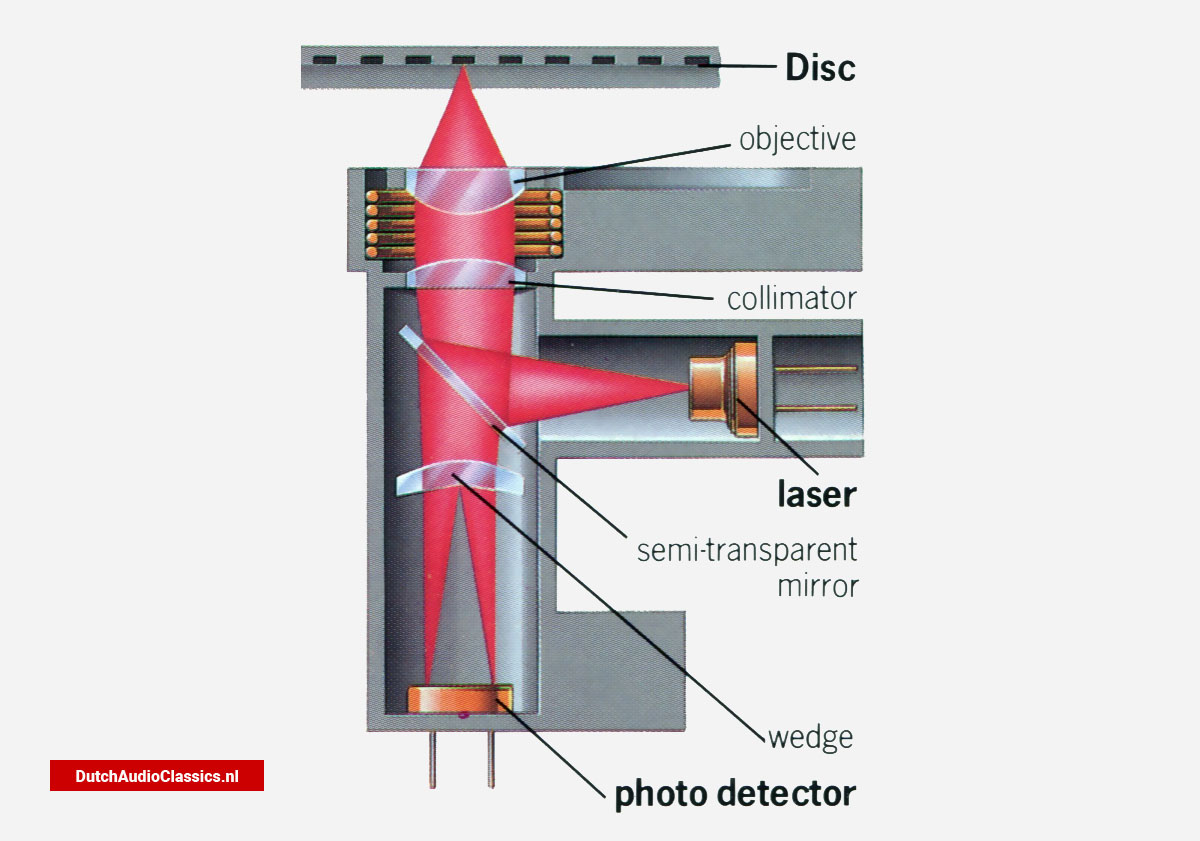 The beam from the laser passes straight through a special semi-reflecting prism and on to the lens system, which keeps it in sharp focus on the recording in the Compact Disc. Beam reflections return through the lens system to the semi-reflecting prism, where they are diverted away from the laser and into the photo-detector.
 The decoding diagram
 The Philips CD users pack